
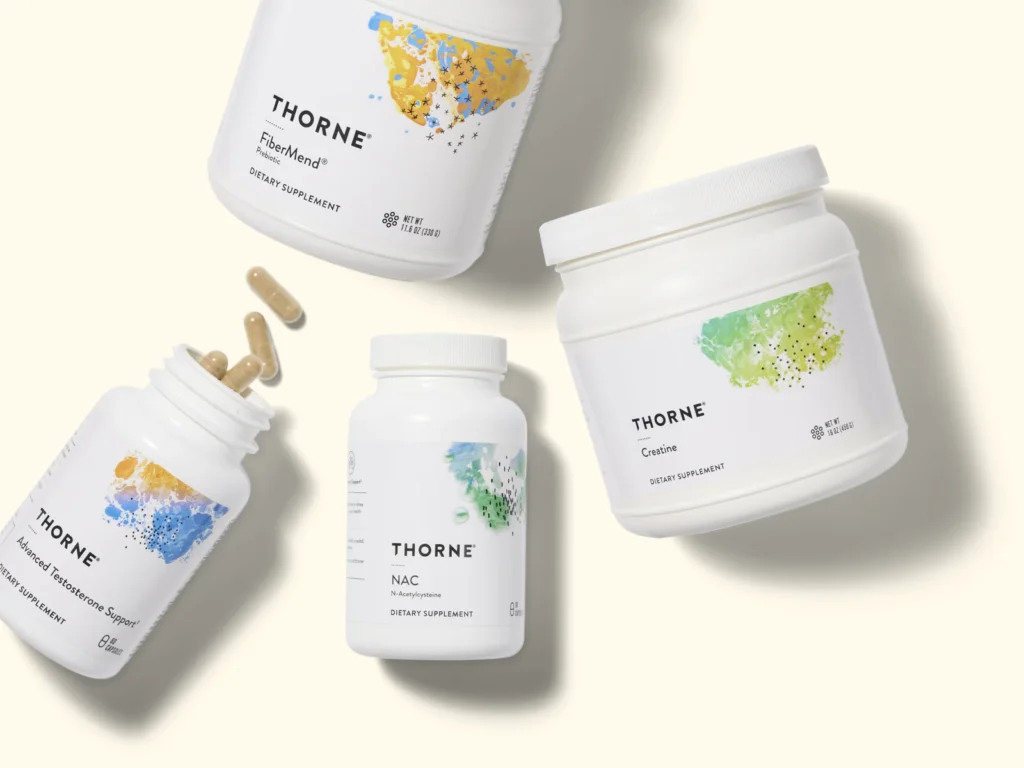
There’s a growing pattern we’ve noticed among high-end wellness brands: beautiful websites that underperform in search. Thorne, a supplement brand doing incredibly well in the market, is a perfect example. The UX is clean, the visuals are premium, and the experience feels trustworthy. But behind all that polish, the site’s SEO foundation tells a different story.
So, we decided to take a Socratik spin and run a “reverse case study.” Instead of showcasing what we did for a client, we’re breaking down what a high-authority brand like Thorne is getting wrong (and a few things they’re nailing). The goal is to show how design and development choices, even the small and unintentional ones, can quietly block visibility, traffic, and conversions.
Through a technical SEO audit, we found a recurring theme: features that look great for users, such as carousels, dynamic product listings, and blog layouts, often vanish when JavaScript is disabled. In other words, search engines may not be seeing the same site we as people do.
Here’s what Thorne is doing well, where the technical gaps show up, and what other eCommerce and wellness brands can take away from it.
Carousel Feature and JavaScript Dependency
What’s Done Well:
- Interactive Carousel Feature: The carousel on the homepage showcasing product offerings (e.g., Skin, Hair, and Nails) with navigation arrows enhances user engagement by providing an interactive way to explore product categories, potentially improving dwell time and click-through rates to category pages.
- Links to Product Category Pages: Including links to specific product categories in the carousel supports internal linking, which helps distribute page authority and guides users to relevant sections, benefiting both SEO and user experience.

What Needs Improvement:
- JavaScript Dependency for Carousel Navigation: The carousel arrows not functioning when JavaScript is disabled indicates a heavy reliance on JavaScript for core navigation functionality. This is a technical SEO issue because:
- Search engines like Google can process JavaScript, but content or links dependent on user-triggered JavaScript events (e.g., clicking arrows) may not be crawled effectively, potentially reducing the discoverability of linked category pages.

- Missed Crawl Opportunity for Links: If the carousel’s product category links are only accessible via JavaScript-driven interactions, search engines may miss indexing these links, limiting the crawlability of important category pages.
Expert SEO Advice for Improvement:
- Implement Progressive Enhancement: Ensure the carousel’s content (e.g., product category links) is accessible without JavaScript. For example, display a static list of category links or a simplified version of the carousel when JavaScript is disabled, ensuring crawlers and users can access all linked pages.
- Use Server-Side Rendering (SSR) or Prerendering: Render the carousel’s initial state server-side so that search engines can crawl the category links without needing to execute JavaScript. Tools like Next.js or prerendering services can facilitate this.
- Add Static Navigation Fallback: Include a fallback navigation option (e.g., a “View All Categories” link or static category list below the carousel) to ensure all product category pages are accessible to both crawlers and users, regardless of JavaScript.
Products Page and JavaScript Dependency
What Needs Improvement:
- JavaScript Dependency for Product Display: The products not displaying when JavaScript is disabled indicates a critical reliance on JavaScript for rendering core content. This is a significant technical SEO issue because:
- Search engines like Google can crawl JavaScript-rendered content, but heavy reliance on client-side JavaScript may lead to delayed or incomplete indexing, especially if the content isn’t prerendered or server-side rendered.
- This could reduce the crawlability of product pages, limiting their visibility in search results and potentially affecting organic traffic.
- Search engines like Google can crawl JavaScript-rendered content, but heavy reliance on client-side JavaScript may lead to delayed or incomplete indexing, especially if the content isn’t prerendered or server-side rendered.
- Potential Loss of Crawlable Links: If product links or details are only loaded via JavaScript, search engines may miss indexing these critical pages, reducing the site’s overall indexability and discoverability.
Expert SEO Advice for Improvement:
- Implement Server-Side Rendering (SSR) or Static Rendering: Ensure product listings are rendered server-side or prerendered so that search engines and users without JavaScript can access them. Frameworks like Next.js or prerendering services can help achieve this.
- Use Progressive Enhancement: Design the products page to display a basic, static version of product listings (e.g., a simple list with links to product pages) when JavaScript is disabled. This ensures accessibility and crawlability while maintaining interactivity for JavaScript-enabled users.
- Include Static Fallback Links: Add a static list of product categories or key products on the page (e.g., below the dynamic section) to ensure crawlers can discover and index product pages, even without JavaScript.
Crawl Depth, URL Structure, and Site Architecture
What’s Done Well:
Clean and Logical URL Structure: The URLs are descriptive, concise, and follow a clear hierarchy:
-
- Main products page: https://www.thorne.com/products
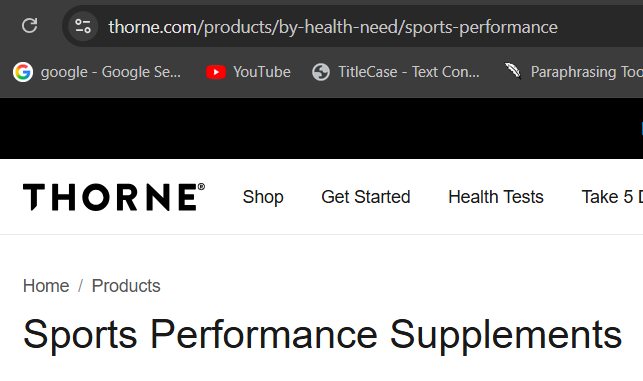
- Category page: https://www.thorne.com/products/by-health-need/sports-performance
- Product page: https://www.thorne.com/products/dp/super-epa This structure is SEO-friendly, as it uses meaningful keywords (e.g., “sports-performance,” “super-epa”) and clearly indicates the page’s purpose.
- Main products page: https://www.thorne.com/products
- Shallow Crawl Depth: The site architecture allows users to reach product pages in just three clicks from the homepage (Homepage → Products → Category → Product). This shallow crawl depth ensures search engines can easily discover and index product pages, improving crawl efficiency.
- Consistent URL Pattern: The use of /products as a base for all product-related pages provides a consistent and intuitive structure, aiding both user navigation and search engine crawling.
What Needs Improvement:
Lack of Breadcrumb Navigation: Implementation of Breadcrumbs navigation can be better optimised (e.g., Home > Products > Sports & Performance > Super EPA) enhance user navigation and help search engines understand the site hierarchy. Without them, Thorne may miss out on improving crawlability and user experience.

Breadcrumb Issues on Product Description Pages (PDPs)
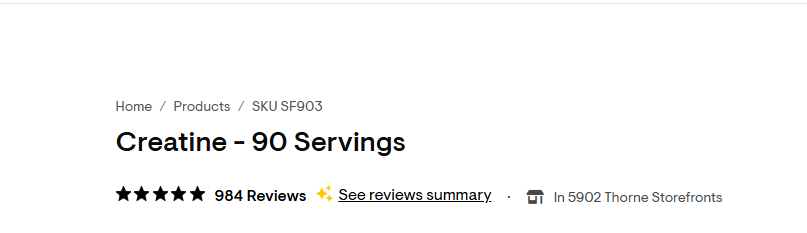
- Current Breadcrumb: Home / Products / SKU SF903
Problems:
-
- The breadcrumb uses the SKU rather than a descriptive product name.
- No category hierarchy is reflected, so Google and users don’t understand the context of the product.
- Minimal SEO value. “SKU SF903” adds nothing for search engines or user navigation.
- The breadcrumb’s SKU links to the same product page (e.g., Home / Products / SKU SF903 links to the current page).
Self-linking breadcrumbs provide no SEO value.
- The breadcrumb uses the SKU rather than a descriptive product name.
They don’t help users navigate to higher-level pages, which is the main purpose of breadcrumbs.
Actionable Improvements
- Use Descriptive Names:
- PDPs: Home / Supplements / Sports Performance / Creatine
- Remove the link from the current page in the breadcrumb.
- Ensure only parent categories are linked, with the product name left unlinked.
- PDPs: Home / Supplements / Sports Performance / Creatine
No Keyword Optimization in Category URLs
While the category URL (/by-health-need/sports-performance) is descriptive, the /by-health-need/ segment could be simplified or optimized for more specific keywords (e.g., /sports-performance) to make URLs shorter and more keyword-focused.
Expert SEO Advice for Improvement:
- Implement Breadcrumb Navigation: Add breadcrumb trails on category and product pages (e.g., Home > Products > Sports & Performance > Super EPA) to improve user navigation and provide search engines with clear hierarchical signals. Use BreadcrumbList schema markup to enhance visibility in search results.
- Optimize Category URLs: Simplify category URLs by removing unnecessary segments like /by-health-need/ (e.g., https://www.thorne.com/products/sports-performance). This makes URLs shorter, more keyword-focused, and easier to share.
- Streamline Product URLs: Evaluate whether the /dp/ segment in product URLs is necessary. If not, simplify to https://www.thorne.com/products/super-epa for cleaner, more user-friendly URLs that still maintain keyword relevance.
Navigation and Tests Page Accessibility

What Needs Improvement:
- Lack of Main Navigation for Tests: The absence of a “Tests” link in the main navigation menu is a significant oversight. This makes it harder for users to discover the tests page organically, potentially reducing traffic to this section and impacting conversions for testing products. It also signals to search engines that the tests section may be less important, which could lower its ranking potential.
- Potential Crawlability Issue: Without a prominent link in the main navigation, the tests page may rely on secondary links (e.g., footer, internal content, or sitemap) for discovery by search engines. This could increase crawl depth for the tests page and its subpages, making them less likely to be prioritized by crawlers.
- Missed User Engagement Opportunity: Not featuring “Tests” in the main navigation may reduce visibility for key product offerings.
Expert SEO Advice for Improvement:
- Add Tests to Main Navigation: Include a “Tests” link in the main navigation menu (e.g., alongside “Shop” or “Products”) to improve user accessibility and signal its importance to search engines. This will reduce crawl depth and enhance discoverability of the tests page and its subpages.
Health Tests Page Layout and Table Placement

https://www.thorne.com/at-home-tests
What Needs Improvement:
- Suboptimal Table Placement for Conversions: The table listing best-selling health tests is placed too far down the page, below the customer reviews, case study, and “What You’ll Discover” sections. This layout prioritizes informational content over the primary conversion driver (product listings), which could reduce click-through rates to product pages and hinder conversions.
- Delayed Product Visibility: For users seeking to purchase tests, the delayed presentation of the product table may increase bounce rates, as users must scroll past multiple sections to find actionable content (the tests themselves).
- Potential SEO Impact: While the table’s content is keyword-rich, its lower placement on the page may reduce its prominence in the eyes of search engines, as content higher up is often prioritized for relevance.
Expert SEO Advice for Improvement:
- Reposition the Health Tests Table:
- Move the “Best-Selling Health Tests” table closer to the top of the page, ideally immediately after the hero section. This prioritizes the primary conversion driver, making it easier for users to find and engage with test products, which can improve click-through rates and conversions.
- Example layout: Hero Section → Health Tests Table → What You’ll Discover → Case Study → Customer Reviews → Explore All Health Tests CTA.
- Maintain Supporting Content for Engagement:
- Keep the “What Our Customers Are Saying,” “What You’ll Discover,” and case study sections, but place them below the product table to provide context and build trust after users see the primary offerings.
- Use concise, scannable formats for these sections to avoid overwhelming users and maintain focus on conversions.
- Apply Product schema markup to each test in the table to enhance search engine visibility and enable rich snippets (e.g., prices, reviews) that can drive clicks, especially if the table is moved higher for prominence.
Blog Posts & JavaScript Dependency
What Needs Improvement:
- JavaScript Dependency for Blog Content:
- Issue: Blog post content not appearing when JavaScript is disabled indicates a heavy reliance on client-side JavaScript rendering. This is a critical technical SEO issue because:
- Search engines like Google can crawl JavaScript-rendered content, but heavy reliance on client-side rendering may lead to delayed or incomplete indexing, especially if the content isn’t prerendered or server-side rendered.
- Accessibility is compromised for users with JavaScript disabled (e.g., screen readers, low-bandwidth connections, or privacy-focused browsers), harming user experience and inclusivity.
- This could reduce the visibility of keyword-rich blog content, impacting rankings.
- Search engines like Google can crawl JavaScript-rendered content, but heavy reliance on client-side rendering may lead to delayed or incomplete indexing, especially if the content isn’t prerendered or server-side rendered.
- Issue: Blog post content not appearing when JavaScript is disabled indicates a heavy reliance on client-side JavaScript rendering. This is a critical technical SEO issue because:
Example URL: https://www.thorne.com/take-5-daily/article/dont-sabotage-your-sleep

Take 5 Daily Blog Page and JavaScript Dependency
What Needs Improvement:
- JavaScript Dependency for Blog Posts and Thumbnails:
- Issue: The blog posts, thumbnail images, and pagination disappearing when JavaScript is disabled indicates a heavy reliance on client-side JavaScript rendering. This is a critical technical SEO issue because:
- Search engines like Google can crawl JavaScript-rendered content, but heavy client-side rendering may lead to delayed or incomplete indexing, potentially reducing the visibility of blog posts for relevant keywords.
- Search engines like Google can crawl JavaScript-rendered content, but heavy client-side rendering may lead to delayed or incomplete indexing, potentially reducing the visibility of blog posts for relevant keywords.
- Impact: This could reduce the blog’s ability to rank for long-tail keywords and limit the discoverability of individual posts, especially those buried in paginated results.
- Issue: The blog posts, thumbnail images, and pagination disappearing when JavaScript is disabled indicates a heavy reliance on client-side JavaScript rendering. This is a critical technical SEO issue because:
- Potential Crawl Depth Issue: If pagination relies solely on JavaScript, search engines may struggle to discover and index deeper blog pages (e.g., page 2, 3, etc.), reducing the visibility of older or less prominent content.
https://www.thorne.com/take-5-daily
Expert SEO Advice for Improvement:
- Fix JavaScript Dependency for Blog Content:
- Implement Server-Side Rendering (SSR) or Prerendering: Ensure blog posts, thumbnails, and pagination are rendered server-side or prerendered so that search engines can access them.
- Implement Server-Side Rendering (SSR) or Prerendering: Ensure blog posts, thumbnails, and pagination are rendered server-side or prerendered so that search engines can access them.
- Optimize Pagination for SEO:
- Replace JavaScript-dependent pagination with static or HTML-based pagination links (e.g., <a href=”/take-5-daily/page/2″>Page 2</a>) to ensure search engines can crawl all blog pages.
- Replace JavaScript-dependent pagination with static or HTML-based pagination links (e.g., <a href=”/take-5-daily/page/2″>Page 2</a>) to ensure search engines can crawl all blog pages.
- Simplify Thumbnail Dependency:
- Ensure thumbnail images are served via static HTML (e.g., <img src=”thumbnail.jpg” alt=”Blog Post Title”>) rather than JavaScript-loaded sources. Include descriptive alt text to improve accessibility and keyword relevance.
- If thumbnails are dynamically loaded, use <noscript> tags to provide fallback images or text links to blog posts.
Product Description Pages
What’s Done Wrong/Needs Improvement
- Heavy JavaScript Dependency: Disabling JavaScript on product pages (e.g., https://www.thorne.com/products/dp/super-epa) causes critical content, product details, images, descriptions, and purchase options to disappear. This reliance on client-side JavaScript rendering poses several issues:
- Crawlability Risk: Search engines may delay or fail to index product details fully, reducing visibility for product-specific keywords (e.g., “Super EPA supplements”).
- Accessibility Issues: Users with JavaScript disabled (e.g., screen readers, low-bandwidth connections) cannot access essential product information or complete purchases, harming user experience and inclusivity.
- Conversion Impact: The inability to view or order products without JavaScript may increase bounce rates and reduce conversions, as users cannot engage with core purchase functionality.
SEO Advice for Improvement
- Implement Server-Side Rendering (SSR) or Prerendering: Render product details, images, descriptions, and purchase buttons server-side or prerender them to ensure accessibility for search engines and users without JavaScript. Frameworks like Next.js or prerendering services can facilitate this.
Product Heading Structure and footer
What Needs Improvement
- Incorrect Heading Hierarchy:
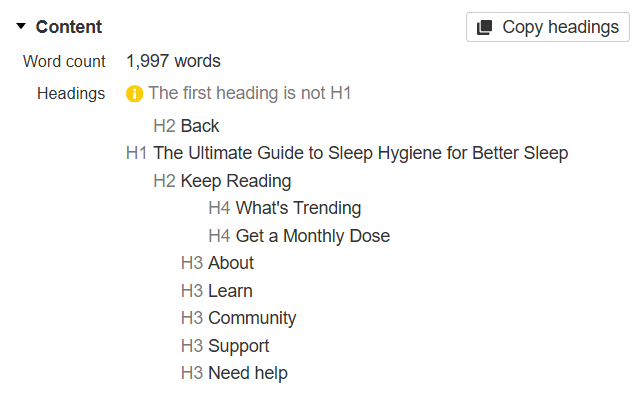
- H2 Before H1: Starting blog posts with an H2 tag (“Back”) before the H1 is non-standard and problematic for SEO. Search engines expect a single H1 as the first heading to define the page’s main topic. An H2 appearing first may confuse crawlers and dilute the page’s topical focus.
- Impact: This could weaken the page’s ability to rank for its primary keyword, as search engines may misinterpret the “Back” H2 as a primary topic or navigation element rather than the actual content focus.
- H2 Before H1: Starting blog posts with an H2 tag (“Back”) before the H1 is non-standard and problematic for SEO. Search engines expect a single H1 as the first heading to define the page’s main topic. An H2 appearing first may confuse crawlers and dilute the page’s topical focus.
- Lack of Subheading Structure (H2s, H3s) in Main Content:
- Issue: The absence of H2s and H3s in the main content of blog posts misses an opportunity to organize content hierarchically, improve readability, and enhance SEO. Subheadings help search engines understand content structure and prioritize key sections for ranking.
- Impact: Without H2s and H3s, blog posts may appear as a single block of text to crawlers, and reduces scannability for users, leading to high bounce rates.
- Issue: The absence of H2s and H3s in the main content of blog posts misses an opportunity to organize content hierarchically, improve readability, and enhance SEO. Subheadings help search engines understand content structure and prioritize key sections for ranking.
- Overuse of H3s in Footer:
- Issue: Using H3 tags for footer navigation links (“About,” “Learn,” etc.) is unconventional, as footer links typically don’t require heading tags. This could confuse search engines, as H3s are meant for content hierarchy, not navigation labels.
- Impact: Misusing H3s in the footer may dilute the semantic structure of the page, as crawlers may interpret these as content headings rather than navigational elements.
- Issue: Using H3 tags for footer navigation links (“About,” “Learn,” etc.) is unconventional, as footer links typically don’t require heading tags. This could confuse search engines, as H3s are meant for content hierarchy, not navigation labels.
SEO Advice for Improvement:
- Fix Heading Hierarchy:
- Remove or Reposition H2 “Back”: Replace the H2 “Back” with a non-heading element (e.g., a <div> or <a> styled as a navigation link) to ensure the H1 is the first heading on the page. Alternatively, move the “Back” link to a breadcrumb or navigation bar outside the main content area.
- Ensure Single H1: Confirm each blog post has exactly one H1 tag that clearly describes the page’s main topic (e.g., “Don’t Sabotage Your Sleep: Tips for Better Rest”).
- Remove or Reposition H2 “Back”: Replace the H2 “Back” with a non-heading element (e.g., a <div> or <a> styled as a navigation link) to ensure the H1 is the first heading on the page. Alternatively, move the “Back” link to a breadcrumb or navigation bar outside the main content area.
- Add H2 and H3 Subheadings in Main Content:
- Introduce H2s and H3s to break up blog post content into logical sections. For example, in https://www.thorne.com/take-5-daily/dont-sabotage-your-sleep:
- H2: “Why Sleep Matters for Health”
- H3: “Common Sleep Disruptors”
- H3: “Tips to Improve Your Sleep”
- Use keyword-rich subheadings to target long-tail queries (e.g., “how to improve sleep quality”) and improve scannability for users and crawlers.
- Introduce H2s and H3s to break up blog post content into logical sections. For example, in https://www.thorne.com/take-5-daily/dont-sabotage-your-sleep:
- Optimize Footer Heading Usage:
- Replace H3 tags in the footer with standard HTML elements (e.g., <div> or <span>) styled for navigation. Footer links don’t need heading tags, as they’re navigational, not content-driven.
- Alternatively, use <nav> elements with semantic markup to clearly indicate the footer’s navigational purpose to search engines.
Thin Content in Blog Posts
Thorne’s blog content, such as “The Ultimate Guide to Sleep Hygiene for Better Sleep” is notably thin despite being positioned as a comprehensive “ultimate guide.”
- Although the piece is ~2,000 words, it feels more like a surface-level lifestyle blog than an authoritative “ultimate guide.”
- For YMYL (health, wellness, medical advice), depth, evidence, and credibility matter more than word count.
- There are no references to authoritative studies, journals, or expert reviews, which lowers trust in Google’s eyes.
Weak E-E-A-T Signals
- No citations or references to scientific sources (PubMed, NHS, Mayo Clinic, etc.).
- No clear reviewed-by-medical-professional statement, which is expected for health content.
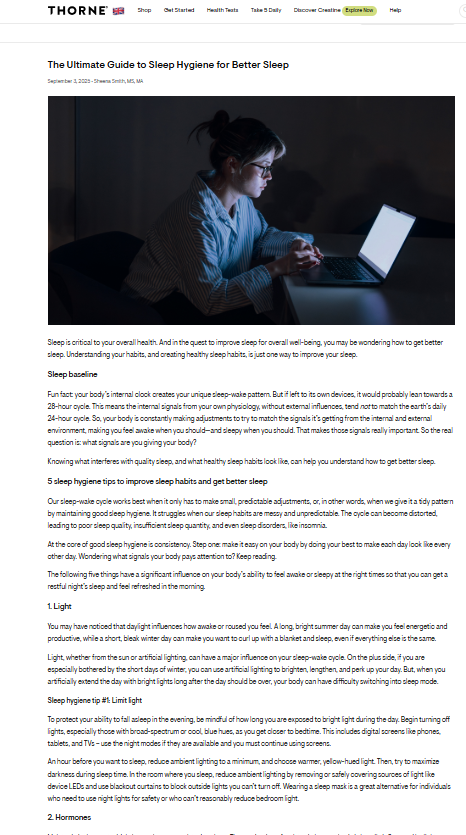
Comparison of Thorne vs Healthline blog post
Healthline nails several elements that make it stronger from both an SEO and YMYL perspective. Here’s the breakdown of what they’ve done right:
1. In-depth, Structured Content
- Clear explanation of what sleep hygiene is and why it matters before diving into tips.
- Provides 12 actionable tips with enough detail to make them useful without being overwhelming.
- Includes daytime habits + nighttime habits (holistic coverage).
- Uses simple, everyday language while still being evidence-based, accessible to a broad audience.
Takeaway: Google rewards depth + clarity in YMYL content.
2. Strong E-E-A-T Signals
- Healthline is a recognized authority site in health content.
- Content is usually written by a medical writer and reviewed by a doctor or expert (not always visible in the snippet, but standard on their site).
- External references are linked to trusted, authoritative sources like:
- They regularly use “Trusted Source” callouts, which builds trust with both readers and Google.
Takeaway: This is gold standard YMYL practice. It shows expertise, back claims with reliable external references, and makes it transparent.
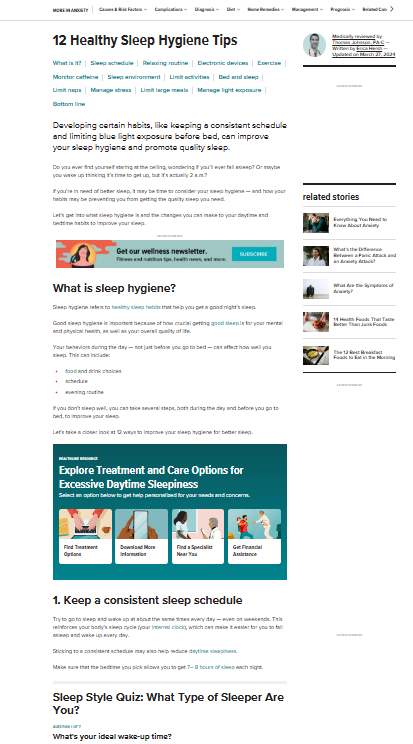

Issue: No Imagery or Media Elements on Thorne’s Blog Posts
- Their posts are text-heavy walls of content, which hurts readability and engagement.
- In the health/YMYL niche, visuals are critical for:
- Improving retention (people remember visuals better than plain text).
- Enhancing credibility (infographics, charts, or medically accurate images signal authority).
- SEO performance (Google values diverse media such as images, videos, structured data (tables)).
- Improving retention (people remember visuals better than plain text).
- Lack of visuals makes their content feel outdated and less trustworthy compared to competitors.
Actionable Fixes:
- Add Relevant, High-Quality Images
- Sleep cycle diagrams.
- Blue light vs. natural light comparison graphics.
- Sleep hygiene checklist visual.
- Sleep cycle diagrams.
- Use Infographics or Summaries
- Create a “Sleep Hygiene at a Glance” infographic (shareable for social + backlinks).
- Visual table comparing good vs bad sleep habits.
- Create a “Sleep Hygiene at a Glance” infographic (shareable for social + backlinks).
- Embed Videos
- Short explainer videos on sleep hygiene basics.
- Expert interviews (doctor/nutritionist) to boost E-E-A-T.
- Short explainer videos on sleep hygiene basics.
- Add Interactive Elements
- Checklists users can download or tick off.
- Checklists users can download or tick off.
- SEO Benefits of Media
- Optimize images with alt text + descriptive filenames (targeting long-tail keywords).
- Use structured data for video content.
- Chance to rank in Google Images + video SERPs, not just text.
- Optimize images with alt text + descriptive filenames (targeting long-tail keywords).
Bottom line: By not using images, videos, or tables, Thorne is losing both engagement and SEO opportunities. Adding visual + interactive elements would improve time on page, shareability, and authority signals, which are especially critical in YMYL.
Issue: Lack of UX Features (TOC, Jump Links, Read Time, Key Takeaways)
- Thorne’s blogs are long text blocks with no scannability features.
- In the YMYL niche, readers want quick, digestible answers. If they don’t find them fast, they bounce.
- Google also rewards pages that improve navigation, accessibility, and content structure (TOC = rich snippets).
- Competitors in health often use sticky TOCs, summaries, and “key takeaways” boxes to keep users engaged.
Actionable Fixes:
- Add a Table of Contents with Jump Links
- Improves scannability + navigation.
- Helps Google show “jump to” sitelinks in SERPs.
- Example:
- What is Sleep Hygiene?
- Why Sleep Matters for Health
- 10 Best Sleep Hygiene Habits
- Common Mistakes to Avoid
- What is Sleep Hygiene?
- Improves scannability + navigation.
- Include “Read Time” Estimates
- Simple: “7 min read.”
- Sets expectations and reduces bounce rate.
- Simple: “7 min read.”
- Add Key Takeaways Boxes
- At the top or bottom of articles.
- Example: “Key Takeaway: Sleep hygiene is about controlling your sleep environment + habits. Focus on consistency, light exposure, and relaxation.”
- Great for featured snippets + TL;DR readers.
- At the top or bottom of articles.
- Use Callout Boxes for Important Info
- Do’s vs Don’ts lists.
- Highlighted “Doctor’s Note” style sections to build E-E-A-T.
- Do’s vs Don’ts lists.
Comparison: Healthline vs. Thorne (Jump Links Use) – Example:
Healthline’s Approach
- Right after the H1, they present a jump-link list:

Why this works:
-
- Makes long-form content instantly scannable.
- Users can skip to what they care about (e.g., caffeine or naps).
- Google may display sitelinks in SERPs, boosting CTR.
- Improves time on page, since users don’t bounce out looking for specific info.
- Makes long-form content instantly scannable.
Issue: “Take 5 Daily” Header on Every Blog Post
- Thorne places the “Take 5 Daily” category header above every blog post.
- This creates visual clutter and distracts from the main article title.
- From a UX standpoint:
- It looks repetitive. Users already know they’re on the blog.
- It pushes the actual content further down the page, reducing immediate engagement.
- On mobile, it’s even worse because it takes up valuable above-the-fold space.
- It looks repetitive. Users already know they’re on the blog.
- From an SEO standpoint:
- Google prioritizes content above the fold. By pushing the H1 lower, they risk diluting relevance signals.
- It also weakens branding of individual blog posts, since “Take 5 Daily” becomes more prominent than the actual topic.
- Google prioritizes content above the fold. By pushing the H1 lower, they risk diluting relevance signals.
Actionable Fixes:
- Reduce the Header’s Weight
- Keep “Take 5 Daily” as a small breadcrumb (already there: Home > Take 5 Daily > Article).
- Remove the oversized “Take 5 Daily” heading.
- Keep “Take 5 Daily” as a small breadcrumb (already there: Home > Take 5 Daily > Article).
- Move Tabs (Articles, Videos, Podcasts)
- Shift them to the sidebar so they don’t dominate the top.
- Shift them to the sidebar so they don’t dominate the top.
- Focus Above-the-Fold on the Blog Title
- The first thing users should see is:
- H1 (Article Title).
- Author & Date.
- Optional read-time estimate.
- H1 (Article Title).
- The first thing users should see is:
EEAT Signals on Blog Posts
What’s Done Wrong/Needs Improvement:
- Lack of Author Bio or Author Page:
- Issue: The absence of an author box with a brief bio or a link to a dedicated author page limits the depth of Expertise and Authoritativeness signals. Simply listing “Sheena Smith, MS, MA” without additional context (e.g., a bio or link to a profile) misses an opportunity to showcase the author’s qualifications, experience, or connection to Thorne’s mission.
- Impact:
- Search engines like Google prioritize content with clear author expertise, especially for YMYL (Your Money or Your Life) topics like health. Without a bio or author page, Thorne’s blog posts may be seen as less authoritative compared to competitors with detailed author profiles.
- Search engines like Google prioritize content with clear author expertise, especially for YMYL (Your Money or Your Life) topics like health. Without a bio or author page, Thorne’s blog posts may be seen as less authoritative compared to competitors with detailed author profiles.
- Issue: The absence of an author box with a brief bio or a link to a dedicated author page limits the depth of Expertise and Authoritativeness signals. Simply listing “Sheena Smith, MS, MA” without additional context (e.g., a bio or link to a profile) misses an opportunity to showcase the author’s qualifications, experience, or connection to Thorne’s mission.
- Missed Opportunity for Internal Linking: Not linking to an author page or related content (e.g., other posts by the same author) limits internal link equity and user navigation to additional authoritative content.
- Limited EEAT Reinforcement: Beyond the byline, there’s no mention of additional EEAT signals like citations, external links to clinical studies, and expert endorsements which could further strengthen trustworthiness.
Expert SEO Advice for Improvement:
- Add an Author Bio Box:
- Include a brief author bio box at the end of each blog post (e.g., “Sheena Smith, MS, MA, is a sleep health expert with over 10 years of experience in nutrition and wellness, contributing to Thorne’s mission of personalized health solutions.”). This enhances Expertise and Trustworthiness by providing context about the author’s qualifications.
- Place the bio box in a consistent location (e.g., below the post content) to improve user experience and signal credibility.
- Link to Author Pages:
- Link the byline (“Sheena Smith, MS, MA”) to the dedicated author page using anchor text like “About the Author.”
- Include author credentials, certifications, and affiliations with Thorne’s research or health initiatives to boost Authoritativeness.
- Enhance EEAT Signals:
- Add citations or links to clinical studies referenced in the post (e.g., studies on melatonin or cortisol) to reinforce Expertise and Authoritativeness. For example, link to peer-reviewed research or Thorne’s own clinical data.
- Include a “Reviewed by” line (e.g., “Reviewed by Dr. John Doe, MD”) for health-related posts to further establish credibility, especially for YMYL content.
Product Category Pages
What Needs Improvement:
- Lack of Text Content on Product Category Pages:
- Issue: The absence of a dedicated text content section (e.g., a category description or informational content about sports performance supplements) on the product category page is a significant missed opportunity. Typical e-commerce category pages include descriptive text to provide context, target keywords, and engage users.
- Impact:
- SEO: Without text content, the page misses out on targeting long-tail keywords (e.g., “best sports performance supplements,” “supplements for athletic endurance”) that could drive organic traffic. This limits the page’s ability to rank for broader category-related queries.
- User Engagement: Lack of content reduces the page’s ability to educate users about the benefits of sports performance supplements, potentially lowering engagement and conversion rates.
- SEO: Without text content, the page misses out on targeting long-tail keywords (e.g., “best sports performance supplements,” “supplements for athletic endurance”) that could drive organic traffic. This limits the page’s ability to rank for broader category-related queries.
- Issue: The absence of a dedicated text content section (e.g., a category description or informational content about sports performance supplements) on the product category page is a significant missed opportunity. Typical e-commerce category pages include descriptive text to provide context, target keywords, and engage users.
- Missed Internal Linking Opportunities: Without a text section, there’s no space to include contextual internal links to related products, blog posts, or health tests (e.g., https://www.thorne.com/tests), which could enhance user navigation and distribute page authority.
Expert SEO Advice for Improvement:
- Add a Product Category Description:
- Include a keyword-rich, informative text section (200–400 words) at the top or bottom of the category page.
- Target long-tail keywords (e.g., “sports performance supplements,” “NSF certified supplements for athletes”) to improve organic rankings.
- Highlight Thorne’s expertise (e.g., partnerships with UFC, clinical research) to strengthen EEAT signals.
- Include a keyword-rich, informative text section (200–400 words) at the top or bottom of the category page.
- Incorporate Internal Links:
- Within the category description, add contextual links to key products and blog posts.
FAQs on Homepage
What’s Done Well:
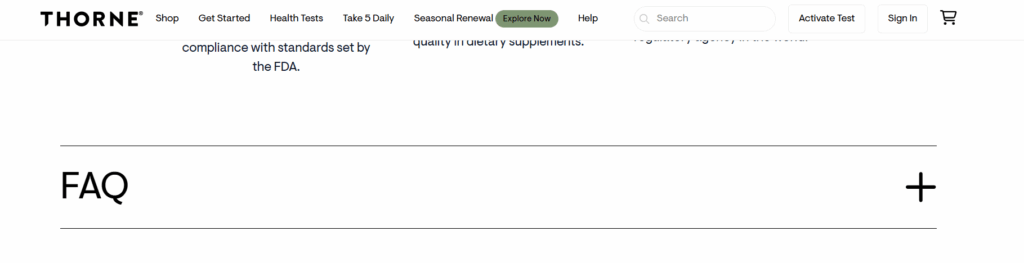
- Interactive FAQ Feature: The expand-on-click feature for FAQs on the homepage enhances user experience by providing a clean, interactive way to access information without cluttering the page.
What Needs Improvement:
- JavaScript Dependency for FAQs: The FAQs not appearing when JavaScript is disabled indicates a critical reliance on JavaScript for rendering essential content. This is a technical SEO issue because:
- Search engines like Google can crawl JavaScript-rendered content, but they may deprioritize or struggle with content that requires JavaScript to load, especially if not optimized for server-side rendering (SSR) or prerendering.
- Accessibility is compromised for users with JavaScript disabled (e.g., screen readers or low-bandwidth scenarios), which can harm user experience and inclusivity.
- Potential Crawlability Issue: If FAQs contain important keywords or information relevant to search intent, their JavaScript dependency could reduce their visibility to search engines, impacting rankings.
SEO Advice for Improvement:
- Implement Server-Side Rendering (SSR) or Static Rendering: Ensure FAQs are rendered server-side or prerendered so that search engines and users without JavaScript can access them. Tools like Next.js or prerendering services can help.
- Use Progressive Enhancement: Design the FAQs to display basic content (e.g., plain text or static headings) when JavaScript is disabled, ensuring accessibility and crawlability while maintaining interactivity for JavaScript-enabled users.
Merchant Center Improvements
Thorne’s Merchant Center presence is weak compared to competitors. With sharper imagery and optimized feed data, they could dramatically improve both organic product ranking visibility and conversion trust signals.

Issues with Thorne’s Merchant Center Setup
1. Product Imagery
- Images look flat and low quality.
- There’s an odd black background bleed, which makes the products look unprofessional compared to competitors (like Momentous).
- In YMYL + supplements, trust signals are critical. Poor photography reduces credibility and CTR.
2. Product Titles Are Poorly Optimized
- Example: “Creatine Thorne”
- Not how users search.
- Lacks important attributes (form, size, benefits).
- Not how users search.
- Google Merchant Center relies heavily on title relevance for surfacing products in Shopping/organic carousels.
3. Likely Data Feed Weaknesses
- Titles are not keyword-rich.
- No sign of structured attributes (flavor, serving size, format).
- Missing key differentiators (e.g., “NSF Certified,” “Vegan,” “Micronized,” etc.), which users do search for.
Actionable Fixes
1. Upgrade Product Photography
- Use high-resolution packshots on clean white or transparent backgrounds (Google’s preferred).
2. Rewrite & Optimize Product Titles
- Formula: [Brand] [Product] [Form/Variation] [Size/Quantity] [Key Attribute/Benefit]
Example:
- Current: Creatine Thorne
- Improved: Thorne Creatine Monohydrate Powder – 16 oz | NSF Certified for Sport
Benefits
-
-
- Higher keyword relevance.
- Improved CTR.
- Surfaces for long-tail searches like “NSF certified creatine powder”.
- Higher keyword relevance.
-
Product Schema on Product Pages
Thorne’s thin product schema is leaving money on the table. Expanding schema to cover offers, identifiers, policies, and detailed reviews will directly boost visibility and conversions.

Issues with Product Schema
1. Incomplete Product Information
- Only name, image, and description are marked up.
- No SKU (unique stock-keeping unit), which is vital for inventory tracking + Google Merchant Center feed alignment.
- No GTIN (Global Trade Item Number), which Google specifically requires for supplements and packaged goods to disambiguate products. Missing GTINs can lead to reduced visibility or disapprovals in Merchant Center.
2. No Offer Information
- Missing offers → price, priceCurrency, availability, url, and itemCondition.
- This prevents Google from showing price-rich snippets in SERPs.
5. No Policies Marked Up
- No schema for shipping or returns policy, which are part of Google Merchant Center + organic trust signals.
Product Schema on Blog Posts
- For blog posts, they are only using OnlineStore and WebSite schema markup.

Issues
- They are not using BlogPosting or Article schema on their actual blog posts.
Google relies on Article/BlogPosting schema to understand:
-
- Title
- Author
- Published/modified dates
- Main content
- Images
- Keywords/tags
- Title
Without it, blog posts may miss out on rich results like Top Stories, rich snippets, and better indexing signals.
- Missing structured metadata that impacts SEO and CTR
- No author or publisher info on posts reduces credibility for YMYL content.
- No datePublished or dateModified can hurt freshness signals.
- No headline, image, or description for each blog post. This is a missed opportunity for rich previews in search.
- No author or publisher info on posts reduces credibility for YMYL content.
- Overly generic schema
- OnlineStore and WebSite are site-level schemas. They don’t tell Google anything about individual blog content.
- Blog posts get treated as generic pages instead of rich, authoritative content.
- OnlineStore and WebSite are site-level schemas. They don’t tell Google anything about individual blog content.
- YMYL risk
- Blog content in health/nutrition (YMYL) needs clear author credentials (Person schema with medical/health expertise) to boost E-E-A-T signals. Currently, there is none.
Actionable Tips
- Add BlogPosting or Article schema for each blog post
- Include:
- headline → blog post title
- author → full name + credentials
- publisher → company info + logo
- datePublished and dateModified
- mainEntityOfPage → canonical URL
- image → featured image
- headline → blog post title
- Include:
- Include structured author information
- Use Person schema for authors, especially if they are health experts.
- Include credentials, affiliation, and a brief bio. This boosts YMYL E-E-A-T credibility.
- Use Person schema for authors, especially if they are health experts.
- Add FAQ or HowTo schema if applicable
- If blog posts include actionable steps or FAQs, add FAQPage or HowTo schema for rich snippets.
Other Blog Content Issues
- All of their content is quite thin. Even the “ultimate guides”. For health topics like these (YMYL), I think they are going to need to be much more robust to be effective in search.
- Lack of external links to authoritative sources/studies. Tons of internal link to product pages which is great, but they need to back up what they are saying with references to other reputable sources
- No imagery or other media like videos, charts, tables, etc.
- Lack of UX features like table or contents with jump links, key takeaways, “read time” estimate, etc.
- Having the “take 5 daily” header on every blog post is unnecessary and not great design/
At the end of the day, Thorne proves a pattern we’ve been seeing for years: great branding can make you look powerful, but great SEO is what makes you stay powerful.
They’ve clearly invested in experience. The visuals are clean, the UX feels effortless, and the tone builds instant trust. But under the surface, the foundation tells a different story. Pages with weak metadata, a bloated structure, and under-optimized content signal what so many wellness brands struggle with: prioritizing the polish over the performance.
The truth is, Google doesn’t reward aesthetics. It rewards alignment, between what a brand promises and how easily users (and crawlers) can find it. For Thorne, that means there’s an opportunity not just to look like a leader, but to show up like one.